Automate Customer Onboarding from Day One
Turn the messy handoff between sales and delivery into a seamless, automated experience. Every new customer gets the same consistent onboarding — no missed steps, no manual follow-ups.
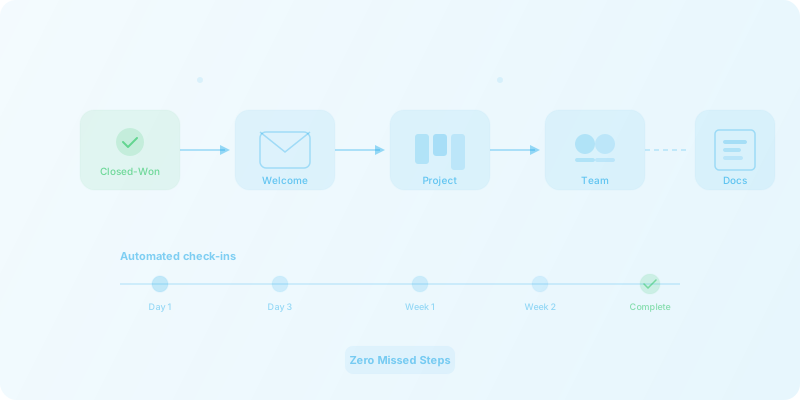
The problem
- New customers wait days for account setup while tasks are tracked in spreadsheets.
- Onboarding steps are missed when handoffs between sales, ops, and support break down.
- No visibility into onboarding progress leads to poor first impressions.
Example onboarding workflow
- 1
Deal marked closed-won
A stage change in your CRM triggers the entire onboarding sequence automatically.
- 2
Welcome email with intake form
The customer receives a branded welcome email and intake form to collect the information your team needs.
- 3
Internal project created
A project or task board is spun up in your project management tool with the correct template and due dates.
- 4
Team assigned and notified
The right team members are assigned and receive a notification in Slack or Microsoft Teams with full context.
- 5
Documents generated and shared
Contracts, SOWs, or setup guides are generated and shared via DocuSign or Google Drive for signature or review.
- 6
Automated check-ins and status updates
Progress is tracked with scheduled check-in emails and status updates sent to the customer throughout onboarding.
Tools commonly involved
ROI and time savings
Automated handoffs and task creation compress onboarding timelines from days to hours.
Every step is tracked and enforced — zero missed tasks, zero dropped handoffs.
Your team reclaims hours previously spent on copy-paste emails, spreadsheet updates, and status chasing.
Onboarding automation FAQ
Which project management tools can be part of the onboarding flow?
We regularly integrate Asana, Monday.com, ClickUp, Jira, and others. If your tool has an API or a connector on Zapier, Make, or n8n, it can be part of the workflow.
Can onboarding steps differ by customer tier or product?
Yes. Conditional logic routes each customer through the right onboarding path based on tier, product, region, or any other data point from your CRM.
How do customers see their onboarding progress?
Customers receive automated status emails at key milestones. For teams that want more visibility, we can also connect a client portal or shared dashboard.
What triggers the onboarding?
The most common trigger is a deal stage change (e.g., closed-won) in your CRM. It can also be a form submission, a signed contract in DocuSign, or a manual trigger for edge cases.
Ready to streamline your onboarding?
Stop losing customers to slow, inconsistent onboarding. Let us build the automation that makes every new client feel like a priority.